
[toc]
| 单词 | 词性 | 音标 | 含义 |
|---|---|---|---|
| Template | n. | /ˈtempleɪt/ | 模板(编程中指预先定义的代码或结构框架,用于简化重复逻辑实现,如Spring的JdbcTemplate封装数据库操作,RestTemplate简化HTTP请求) |
Lecture19-事务-JdbcTemplate
一、需求说明
为了测试事务,需要执行SQL语句,Spring环境下执行SQL语句可以使用JdbcTemplate技术
Spring封装了很多模板类:
- JdbcTemplate
- RestTemplate
- RabbitTemplate
- RedisTemplate
- ……
二、创建工程
在 IoC 所需环境基础上,额外增加依赖:
        <dependency>
            <groupId>org.springframework.boot</groupId>
            <artifactId>spring-boot-starter-jdbc</artifactId>
        </dependency>
三、搭建环境
1、建库建表
create database db_hr260525;
use db_hr260525;
create table t_emp(
	emp_id int auto_increment primary key,
    emp_no char(100),
    emp_name char(100),
    emp_salary double,
    emp_birthday datetime,
    phone_num char(100),
    dept_id int
);
insert into t_emp(emp_no,
                  emp_name,
                  emp_salary,
                  emp_birthday,
                  phone_num,
                  dept_id)
values ('AA22', '祁同伟', 66633.33, now(), '13200112233', 5),
('6633', '高育良', 995577.88, now(), '13233889933', 6),
('1199', '沙瑞金', 992200.88, now(), '16622334455', 9),
('EEEE', '钟小艾', 333224.99, now(), '13299922233', 10);
2、创建数据源
①添加依赖
Java程序连接MySQL数据库的数据库驱动:
        <dependency>
            <groupId>mysql</groupId>
            <artifactId>mysql-connector-java</artifactId>
            <version>8.0.30</version>
        </dependency>
②配置application.properties
注意:这里我们使用的是 SpringBoot 内置的数据源,所以配置项的属性名不能修改
注意:application.properties作为SpringBoot的主配置文件必须放在resources目录下
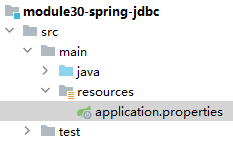
spring.datasource.username=atguigu
spring.datasource.password=atguigu
spring.datasource.url=jdbc:mysql://192.168.100.100/db_hr
spring.datasource.driver-class-name=com.mysql.cj.jdbc.Driver
③创建主启动类
略
④测试
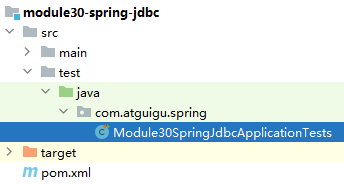
@SpringBootTest
class Module30SpringJdbcApplicationTests {

    @Autowired
    private DataSource dataSource;

    @Test
    public void test01() throws SQLException {
        Connection connection = dataSource.getConnection();
        System.out.println("connection = " + connection);
    }

}
3、获取JdbcTemplate对象
SpringBoot已经为我们准备好了JdbcTemplate,只要我们导入了spring-boot-starter-jdbc依赖,JdbcTemplate的对象就被自动放入了IoC容器,所以我们直接装配进来就可以使用
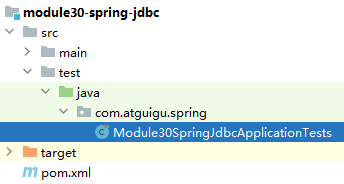
@SpringBootTest
class Module30SpringJdbcApplicationTests {

    @Autowired
    private JdbcTemplate jdbcTemplate;

    @Test
    public void test02() {
        System.out.println("jdbcTemplate = " + jdbcTemplate);
    }

}
四、CRUD
1、增删改操作
// 准备 SQL 语句
String sql = """
        insert into t_emp(emp_no,
                          emp_name,
                          emp_salary,
                          emp_birthday,
                          phone_num,
                          dept_id)
        values (?, ?, ?, now(), ?, ?)
        """;

// 执行 SQL 语句
jdbcTemplate.update(sql, "No.55555", "jerry250327", 9999.99, "13511112222", 2);
SQL 中的问号占位符是为了防止 SQL 注入,类似 Python 中:
sql = "SELECT * FROM user WHERE id = %s AND name = %s"
cursor.execute(sql, (100, "张三")) # 参数单独传元组
2、查询:单个对象
①创建实体类
package com.atguigu.spring.entity;

import lombok.Data;

import java.util.Date;

@Data
public class Employee {
    private Integer empId;      // 员工ID(主键,自增)
    private String empNo;       // 员工编号
    private String empName;     // 员工姓名
    private Double empSalary;   // 员工工资
    private Date empBirthday;   // 出生日期
    private String phoneNum;    // 手机号
    private Integer deptId;     // 部门ID
}
②调用JdbcTemplate方法
String sql = """
        select emp_id empId,
        emp_no empNo,
        emp_name empName,
        emp_salary empSalary,
        emp_birthday empBirthday,
        phone_num phoneNum,
        dept_id deptId from t_emp where emp_id=?
        """;
Employee employee = jdbcTemplate.queryForObject(sql, new BeanPropertyRowMapper<>(Employee.class), 3);
System.out.println("employee = " + employee);
3、查询:集合对象
String sql = """
        select emp_id empId,
        emp_no empNo,
        emp_name empName,
        emp_salary empSalary,
        emp_birthday empBirthday,
        phone_num phoneNum,
        dept_id deptId from t_emp
        """;
List<Employee> employeeList = jdbcTemplate.query(sql, new BeanPropertyRowMapper<>(Employee.class));
for (Employee employee : employeeList) {
    System.out.println("employee = " + employee);
}
4、查询:单个值
@Test
public void test06() {
    String sql = "select max(emp_salary) from t_emp";
    Double maxSalary = jdbcTemplate.queryForObject(sql, Double.class);
    System.out.println("maxSalary = " + maxSalary);
}